Did Amazon Relay pay you for every load you ran?
Drop in last week's trips export and the matching invoice. LoadRecon lines them up load by load and tells you what was paid, what's rolling to next week, and what needs a dispute before the 30-day window closes.
Your files never leave this computer. Both files are read and compared by JavaScript running in your browser — there is no upload, no account, and no server that could store them. How this works & what the ads can see
What LoadRecon checks
Amazon Relay pays on a weekly cycle that runs Sunday 00:00 to Saturday 23:59. Every load you complete before the Saturday cutoff belongs on that week's invoice; anything finishing after it — or whose delivery confirmation lands late — rolls to the next period. That single rule is the reason a week's trips export and a week's invoice almost never contain the same set of loads, and it is why reconciling them by eye in Excel is so error-prone.
LoadRecon matches the two files on Load ID and sorts every load
into one of five buckets:
- Paid — completed and on the invoice with pay against it.
- Paid — Cancellation/TONU — cancelled, but compensated. Relay commonly pays a flat truck-order-not-used fee when it cancels on you.
- Completed, not paid — you ran it, the invoice doesn't show it. Loads finishing near the Saturday cutoff are marked likely rollover; loads that finished well inside the week are marked review — payment missing, because those are the ones worth disputing.
- Cancelled/Rejected — not paid — no compensation received. Whether that is correct depends on who cancelled, which the export files do not record.
- Paid, not in trips file — invoice lines with no matching trip, usually loads that rolled over from the previous week.
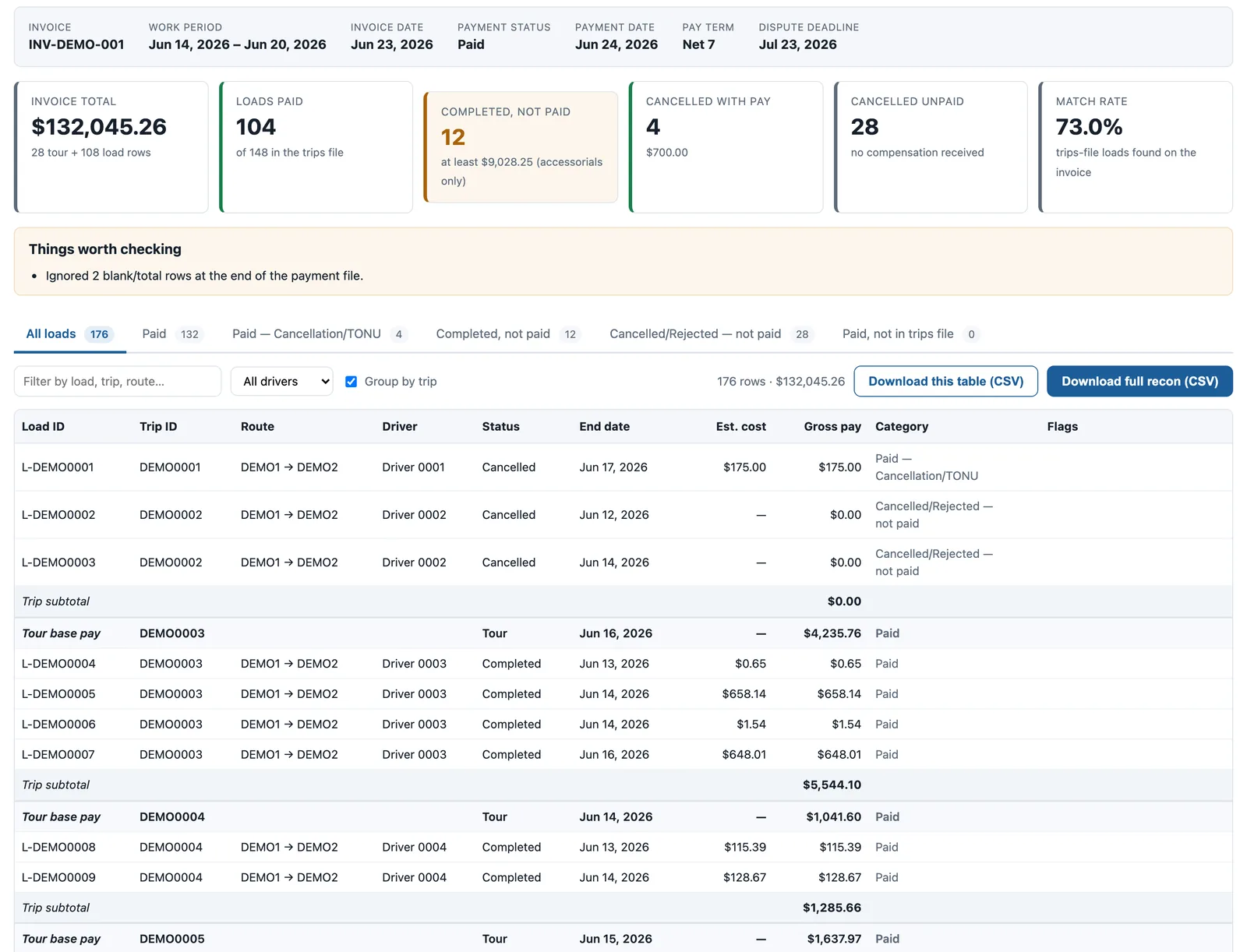
Tour-level rows get their own line in the results. On a multi-load tour the base pay sits on a single TOUR row while the individual loads carry only accessorials such as fuel surcharge and tolls, so a per-load view alone will never add up to your invoice total. LoadRecon shows both and subtotals each trip, which means the on-screen figure should tie exactly to the invoice.
Why reconcile at all?
Carriers running spot work on Relay routinely see a handful of loads a week that are completed but absent from the invoice. Most are genuine rollovers and appear the following week. Some are not, and the only way to tell them apart is to compare two weeks of files. Disputes have a hard 30-day deadline from the invoice date, so a load that slips through unnoticed for a month is simply gone. On a fleet of five trucks a single missed $900 line item a month is over ten thousand dollars a year.
Rate variance is the quieter problem. If a load pays materially less than the rate you accepted it at, the difference rarely announces itself — it just shows up as a slightly smaller deposit. LoadRecon flags any paid load whose gross differs from the estimate on the trips export by more than 10%.
What it does not do
LoadRecon is a comparison tool, not an accounting system. It cannot tell you who cancelled a load, whether a TONU claim is owed, or whether Relay's rate was correct — none of that is in the export files. It does not file disputes, keep history between visits, or track rollovers across weeks; the "likely rollover" label is a heuristic based on the cutoff time, and confirming it means checking next week's invoice. Always verify anything you intend to dispute against the Relay portal itself.
Getting your files
Both files come straight out of the Relay portal, and neither needs editing first — LoadRecon reads the raw export, junk rows and all. Step-by-step: exporting the trips history and downloading the weekly invoice. If you are unsure what a category on your invoice means, the payment categories guide walks through TOUR versus LOAD rows, cancellation pay, and accessorials.